What is Program Rules Playground
Program Rules Playground is an open-source DHIS2 app for testing and debugging program rules.
You pick a program, fill in its forms against your real metadata, and watch the program rules run as you type. Fields hide, show, become mandatory or receive values, and the Feedback and Indicators cards list the messages your rules produce. A rules panel next to the form shows which rules fired, in what order, and which fields they read and changed.
The app supports DHIS2 2.40 to 2.43. See Is it safe to use on production? for what the app sends to your server.
Who it is for
Program configurators and implementers
You are the main users. Use the app when you need to answer questions like these:
- "Why didn't my rule fire?" Fill in the form, then check the rule's status on the Rules tab and the evaluations on the Trace tab.
- "Does this rule do what I expect before we roll it out?" Try the values you care about, check the effects on each field, and compare the result with the server using Verify with server.
DHIS2 administrators
You install the app, decide who can use it, and want to know that it is safe to point at a production server. Start with Install, Requirements and user authorities and Is it safe to use on production?.
Trainers
You can teach program rules with a live view. Change a value and the class sees the badge appear on the field, the rule move to the top of the Rules tab, and a new entry on the Trace tab. The tutorials make a good lesson plan.
Developers
The rule engine, form hooks and rules panel come from the open-source dhis2-form-utils libraries. Their documentation lives in that repository. This site only covers the app.
What the app looks like
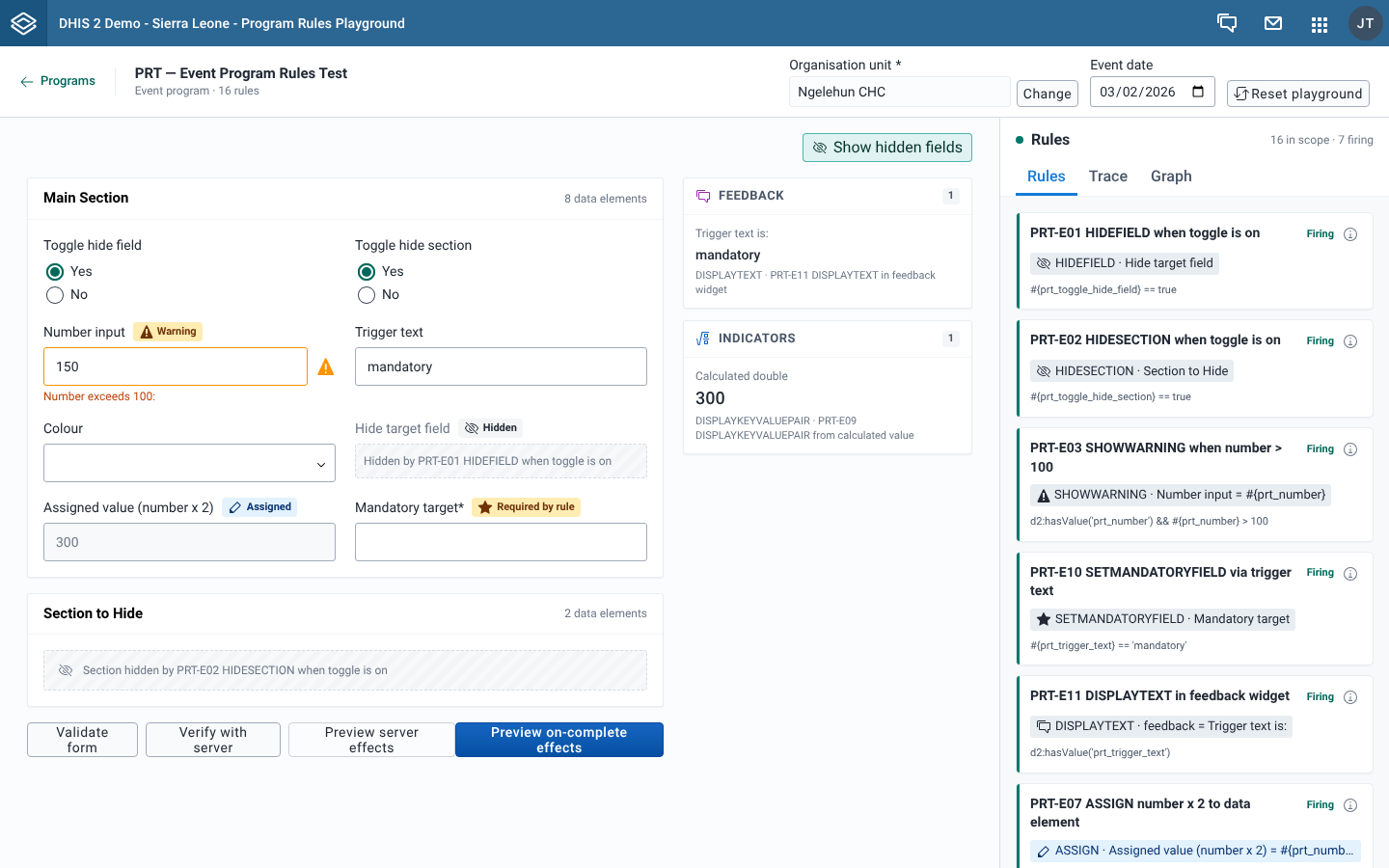
What you see in the screenshot:
- Context bar at the top: the program name, the Organisation unit and Event date fields, and Reset playground.
- Effect badges next to the field labels, such as Hidden, Warning, Assigned and Required by rule. Each badge shows the last effect a rule had on that field.
- Hidden-field placeholders, dashed boxes that read "Hidden by" followed by the rule name. Turn them on or off with Show hidden fields.
- Feedback and Indicators cards, which list the text and values your rules display.
- Form actions under the fields: Validate form, Verify with server, Preview server effects and Preview on-complete effects.
- Rules panel on the right, with the Rules, Trace and Graph tabs.
What you can do
- Find and open a program
- Set the organisation unit and date
- Read field badges and hidden-field placeholders
- Read the Feedback and Indicators sidebar
- Find out why a rule did or didn't fire
- Map rule dependencies
- Open and edit a rule
- Validate a form
- Check rules against the server
- Preview server effects
- Test on-complete rules
- Work with repeatable stages
- Start over